A Sunday News Review with One Open Question
Use a Sunday news review with one open question to organize a week’s coverage, track what changed, and keep unresolved details from turning into assumptions.
The common mistake in a Sunday news review is trying to settle every loose end before the week begins. That can turn a useful pause into a frantic search for certainty—and leave you with a pile of links but no clear account of what changed. A Sunday news review with one open question works better: choose a question, track the week’s coverage around it, and mark what remains unresolved.
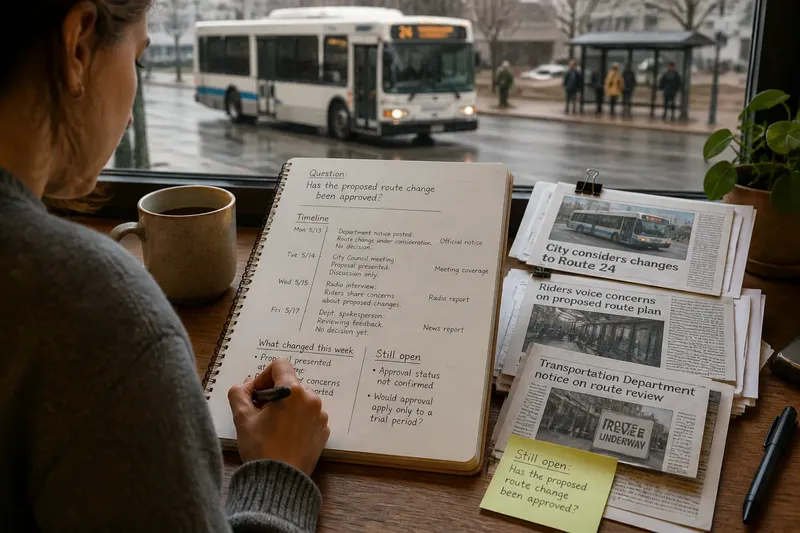
Say a city announces that a public bus route may change after a budget review. By Sunday, a local newspaper has reported a proposal, a radio station has interviewed riders, and the transportation department has posted a notice. Imagine you are following this invented situation and want to know whether the route change has been approved. Your review should capture the latest reported status, not turn scattered coverage into a verdict.
Choose a question with a clear boundary
Start with a question narrow enough to revisit: “Has the proposed route change been approved?” is more manageable than “What will happen to the bus system?” The first asks about a specific decision; the second could pull in fares, service schedules, staffing, and budget debates.
A useful question also avoids building in a conclusion. “Why did officials ignore riders?” assumes they did. “What response, if any, have officials given to riders’ concerns?” leaves room for the coverage to answer—or to show that the response is not yet clear.
Keep the original question visible in your note. If a new detail changes what you need to know, add a separate question rather than rewriting the first one. For instance, if coverage reveals that the proposal concerns a trial period, keep “Has the proposed route change been approved?” and add “Would approval apply only to a trial period?” The first tracks decision status; the second tracks scope.
Build a brief timeline of the week
Use Apple Notes, Google Docs, or a paper notebook. Give the note a subject and date, then record the relevant developments in order. Add links and label each entry with its publication or update time and format: news report, interview, official notice, or meeting record.
A timeline gives you a different view from a list of claims. It makes it easier to see whether a later article adds a development, follows up on an earlier announcement, or simply revisits the same event. Keep it lean: save material that bears on the question, not every passing mention of the subject.
In the invented bus-route situation, the timeline might say: the department posts that it is considering a change; a proposal is presented at a meeting; a radio report records riders’ concerns. That sequence shows activity, but it does not by itself show that officials approved the proposal.
Mark what changed and what stayed open
After arranging the timeline, make two short sections: “What changed this week” and “Still open.” Describe developments in plain language and link each note to the relevant item. This keeps the review focused on movement in the story rather than asking you to reconcile every sentence across every outlet.
- Department notice: If it describes consideration but no decision, record the proposal as under consideration; if it announces a decision, add that decision and its date to the timeline.
- Meeting coverage: If it says a proposal was presented, record that a proposal was discussed; if it reports a vote or formal action, note the action and keep the report link.
- Interview or reaction: If it records riders’ concerns, note that reaction as part of the public response; if it also reports an official reply, add the reply as a separate development.
- Later update: If it adds a new event or decision, append it with its date; if it repeats earlier information, label it as a recap rather than a new development.
- Conflicting descriptions: If two items use different terms for the same event, record both descriptions and check whether they refer to the same stage; if they describe different stages, keep them as separate timeline entries.
- Missing status: If the coverage does not say whether a decision was made, leave approval marked “unconfirmed in the coverage reviewed”; if a relevant decision record is linked, add it and revise the status only as far as that record supports.
For the invented route story, the result might read: “This week, a proposal was presented and riders raised concerns. The coverage reviewed does not establish that the change was approved.” That wording describes the week’s movement without converting discussion into an outcome.
Use a repeatable process for the weekly review
- Write the question. Use one sentence that names the subject and the status or development you want to follow.
- Gather relevant items. Save the reports, notices, or meeting records that directly bear on that question.
- Order developments by date. Add the publication or update time so you can distinguish an earlier account from a later one.
- Mark the change. State what is new this week, and label recaps as recaps rather than developments.
- Write the open point. Name the detail the coverage does not settle, without guessing why it is missing.
- Set a sensible stopping point. Close the question when the reporting answers it for your purpose, or mark it dormant if it no longer deserves attention.
What should a Sunday news review answer?
How many stories should I save?
Keep the items that directly affect the question, plus any linked record that clarifies a development. If a story only repeats background without adding relevant context, a brief note that it was a recap may be enough.
Should social media posts go in the timeline?
Include an attributable post when it records a relevant statement or points to a document, and label it clearly as a post. If it is an unverified circulating claim, keep it out of the timeline of reported developments and mark it as unconfirmed if it matters to your question.
What if coverage seems to contradict itself?
Record the differing descriptions and compare their dates and the events they refer to. If they concern different moments, place them at separate points in the timeline; if the difference remains unresolved, leave it visible rather than choosing a version without support.
When should I stop following a question?
Stop when the reporting answers the question well enough for your purpose or when the issue no longer merits your attention. If it remains open, mark it dormant and return only if a relevant update appears; a weekly note does not need to become a daily monitoring task.
Write a closing status that can age well
End the note with a dated status line, such as: “As of Sunday, the coverage reviewed records a proposal and rider concerns but does not establish approval.” Add what sort of development would change that status, such as a reported decision or published meeting record. This is not a prediction; it tells your future self what to look for.
Imagine the invented bus-route coverage later adds a report of a formal vote. Append the new item and date, then revise the status line while preserving the earlier entry. The timeline will show what you knew at each point, and your Sunday news review with one open question will remain useful even after the story moves on. A clear record of change is often more valuable than a tidy answer forced ahead of the reporting.